PropInspect
Landlord Inspection Apps: How to Choose One and Use It Well
A landlord inspection app is a phone or browser tool that walks you through a rental room by room and turns your photos, videos, and notes into a dated report you can share with a tenant. It replaces the paper checklist and the folder of loose phone photos with one record per inspection.
Start a free inspection Create a free account
Paper checklist, phone photos, or an app?
Plenty of landlords still use a printed move-in form, and it works if it's filled in carefully. Its weakness shows at move-out: the form says "scratched" but not where or how badly, and the photos that would prove it are scattered through a camera roll among thousands of family pictures.
Photos alone aren't a record either. Without room names, notes, and a date tied to the inspection, a folder of 200 pictures is hard for a tenant, a judge, or you to follow a year later.
An inspection app's job is to tie the three together. Each photo sits in the room it belongs to, next to the note that explains it, inside a report that carries the inspection date. That is the whole value; everything else is convenience.
What to look for in a landlord inspection app
- Room-by-room structure: photos and notes are filed under rooms as you take them, not sorted afterwards.
- Video as well as photos: a short clip of a running tap, a noisy fan, or a whole room is often clearer than ten stills.
- Notes you can label, so the report separates existing damage from repairs and general information.
- A report the tenant can open easily. If they have to create an account or install something to see it, many won't, and you lose the chance to correct the record early.
- A PDF you can keep, print, or attach to a deposit statement, independent of the app.
- Capture that keeps working with patchy signal. Basements, new buildings, and rural rentals often have none.
- A price that matches how often you inspect. A landlord with three units might do six to ten inspections a year, and a monthly subscription for that means paying for the idle months too.
- A way to get your reports out, as PDFs, if you ever stop using the app.
Try any app on your own home before you use it on a rental. Fifteen minutes in your kitchen and a bathroom will tell you whether it's quick enough for a full inspection and whether the report is something you'd be happy to send a tenant.
Doing it yourself or hiring an inspector
Third-party move-in and move-out inspection services exist, and they can be worth it for a property you can't visit or a move-out you expect to be contested. They cost much more per visit than doing it yourself, and you still have to arrange access. If you hire one, ask for a sample report first, check that it covers every room with wide shots and notes, and make sure you get the original photos, not just a summary.
For most independent landlords a careful self-inspection is enough. What makes a record credible isn't who made it; it's whether it is specific, dated, complete, and shared with the tenant at the time. A tenant who received your move-in report on day one and didn't object will find it hard to argue later that it's wrong.
A home inspector does a different job. A pre-purchase home inspection assesses structure and systems for a buyer. It isn't a substitute for a tenancy condition record and rarely photographs every wall.
A landlord's inspection calendar
An app earns its keep when you use it at every stage of the tenancy, not just at move-out:
- Before listing: a turnover walkthrough to list repairs and cleaning, then photos of the finished unit.
- Move-in day: the baseline inspection, ideally with the tenant, shared the same day.
- The first few weeks: anything the tenant reports goes into the record as a dated addition.
- Every 6 to 12 months: a routine inspection with notice, focused on leaks, alarms, and systems.
- After notice to vacate: offer a pre-move-out walkthrough so the tenant can fix things before leaving.
- Move-out day: the move-out inspection, compared room by room with the move-in record.
- Within your state's deadline: the itemized deposit statement, with the evidence attached.
Habits that make any app work better
- Name rooms the same way every time, such as Bedroom 1 and Bedroom 2, and walk them in the same order.
- Take one wide shot of each wall before any close-ups.
- Write notes with a location and a size: "Kitchen, left of the stove: 2-inch burn mark on the counter."
- Finish the report on site, before you leave. Notes written from memory that evening are less precise.
- Send the report to the tenant the same day and keep the email.
- Keep the lease, insurance, and inspection reports for each property together, so you aren't searching three places during a dispute.
Setting up your first property
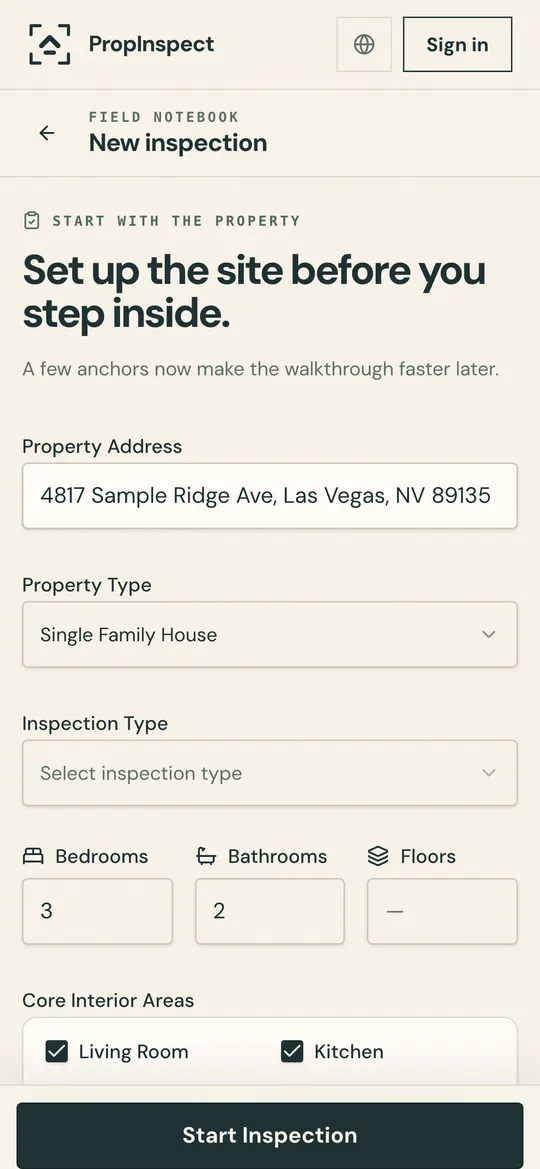
Spend ten minutes on setup and every later inspection is quicker. Record the address and the room list once, in the order you'll walk it. While you're there, photograph where the water shut-off valve, the breaker panel, the gas meter, and the water heater are. Those photos help you, a contractor, or the tenant in an emergency, and they make the routine inspection faster.
Keep the property's documents with it: the lease, the insurance policy, permits, and appliance manuals. When a dispute or a claim comes up, everything about that property is in one place instead of spread across email, a filing cabinet, and your phone.
Tenants can use one too
Inspection apps aren't only for landlords. A tenant who makes their own move-in record and sends it to the landlord is doing the same thing from the other side. When both records agree, there's very little left to argue about at move-out, which saves both of you time. If your tenant sends you their own report, keep it with yours.
What a weak record costs
Deposit disputes are where weak records cost money. A landlord who can't support deductions usually has to return the deposit, and several states add penalties on top. Georgia, for example, allows three times the amount withheld in bad faith, and its rules depend on a move-out inspection and a damage list delivered on time.
Set against that, the cost of a careful record is small: an hour of your time at each end of the tenancy, and whatever your tool charges for it.
State-specific deposit guidance
Your state's rules decide what the record must contain and how fast you have to act at move-out. Our security deposit laws by state guides cover every state's deposit limit, return deadline, and documentation rules, with citations. California, for instance, now has specific rules about move-in and move-out photos.
How PropInspect fits
PropInspect is built for independent landlords. It runs in the phone's browser with no download, sets up the rooms when you type the address, and files photos, clips of up to 60 seconds, and notes tagged Info, Fix, or Damage under each room. If the signal drops mid-inspection, it keeps working and you sync with one tap.
Tenants open the read-only report link without an account, and you can download a PDF. Add your logo and it appears on your reports. Each property also keeps its documents, with anything expiring flagged in the app 30 days ahead.
Frequently asked questions
Do I need to be a professional to use a landlord inspection app?
Not at all. PropInspect is designed for independent landlords with no special training. You walk through the property, take photos and videos, add notes, and the app turns it into a professional report automatically.
How does an inspection app protect my security deposit?
By creating a dated, photo-and-video record of the property's condition at move-in and move-out, you have clear evidence of any damage caused during the tenancy. That documentation is what makes deposit deductions hold up if challenged.
Will a report from an app hold up in a deposit dispute?
No app can promise that, because the outcome depends on your state's law and on what the record shows. What helps is a record that is specific, dated, covers every room, and was shared with the tenant when it was made. An app makes that easier to produce; it doesn't replace it.
How much does it cost?
Your first inspection is free, with no account. After that, each inspection is $0.99. There's no subscription and no plan to choose.
Walk the unit. The report's already done.
Photos, video and notes land in the right room as you go. Share one link before you're back at the office: the repair person sees what to fix, the tenant sees why, the owner sees everything.
- Done at the door, not at your desk
- One link for everyone. No account, no app.
- Dated, room-by-room proof for when the deposit is due
First inspection free, then $0.99. No subscription.