PropInspect
Rental Walkthrough: How to Film and Document One
A rental walkthrough is a guided pass through every room of a rental, usually on video and ideally with the landlord and tenant together, to record its condition at a point in the tenancy. Unlike a checklist, it shows how things look and work in motion: doors closing, taps running, whole floors at once.
Start a free inspection Create a free account
Three walkthroughs, three purposes
- The viewing: a prospective tenant looks round the unit. It isn't a condition record, but it's a good moment to write down anything the tenant asks you to fix before move-in.
- The move-in walkthrough: the baseline, done after cleaning and repairs and before the furniture arrives.
- The final walkthrough: done at or just after move-out, ideally with the tenant, along the same route as at move-in.
This guide covers the move-in and final walkthroughs, and how to make the result evidence rather than just footage.
Plan the route before you press record
A walkthrough is only as good as its route. Pick one and use it at both move-in and move-out: the front door first, then clockwise through each room, then the bathrooms, the kitchen, utility spaces, and the outside. Write the order down. At move-out, the same route lets anyone line up the two recordings room by room.
Inside each room, follow the same pattern: the view from the doorway, the ceiling, each wall from left to right, the floor, and then fixtures and anything that opens. Consistency matters more than perfection.
Film in short clips, not one long video
A single 25-minute video of a whole house is almost useless in a dispute. Nobody wants to scrub through it to find the bathroom, and if the file is lost, everything is lost. Record a short clip per room instead, under a minute each, and take photos of the details.
- Hold the phone horizontally for rooms, and vertically only for tall, narrow things like a closet.
- Move slowly. Pan at about half the speed that feels natural; fast pans blur exactly the detail you need.
- Switch on every light and open the blinds before you start the clip.
- Pause on anything worth noting for two or three seconds, then take a still photo of it as well.
- Show things working: run each tap, flush the toilet, open and close windows and doors, and switch on the range hood.
- At a final walkthrough, keep people's faces and personal belongings out of shot; point the camera at the property.
Get the phone ready first
- Check your free storage. A minute of 4K video can take several hundred megabytes; 1080p is plenty for a walkthrough and uses far less.
- Wipe the lens. A fingerprint smudge softens every shot, and you won't notice until you review the footage.
- Turn off portrait mode, beauty filters, and anything else that alters the image.
- Charge the phone fully, and bring a battery pack for a larger house. Video drains a battery quickly.
- Turn on the flashlight for dark spaces like the back of a cabinet or the water heater cupboard, rather than relying on the camera's night mode.
A walkthrough script you can follow
- Outside: the front of the building with the address number visible, then the front door.
- Entry: the door from both sides, the lock, and the floor.
- Living areas: a slow pan around each room, then the windows and any built-ins.
- Kitchen: each appliance switched on, the sink running, the inside of the oven and fridge, and under the sink.
- Bathrooms: taps and shower running, the toilet flushed, the fan on, and the floor around the toilet.
- Bedrooms: walls, floors, closets opened, and windows.
- Utility spaces: the water heater, the breaker panel, the laundry hookups, and the meters.
- Outside again: the yard, fences, parking, and any storage.
- Closing shot: the keys, fobs, and remotes laid out together on the counter.
What to say on camera
Narration turns footage into a record. Say the room name at the start of each clip, then describe what you're showing as you go, in plain words: "Bedroom two. Ceiling fine. North wall, two small nail holes by the window. Carpet clean, slight wear at the doorway." If the tenant is with you, invite them to point things out on camera too.
Don't speculate about causes on the recording, as in "looks like the dog did this." Describe what you see, and deal with responsibility later, with both records in hand.
State the date and the address at the start of the first clip. It takes five seconds and removes any doubt about which unit and which day you're looking at.
Furnished rentals: film the contents too
If the rental is furnished, the walkthrough also has to record the furniture and contents. Film each piece slowly, open drawers and wardrobes, and list the contents in a note: two lamps, a sofa with three cushions, a dining table with four chairs. A written inventory backed by a clip showing it is much stronger than either on its own.
The final walkthrough: comparing with move-in
At the final walkthrough, have the move-in recording to hand, on a second device or on your phone between clips, and record each room from the same spots. Point out changes on camera: "At move-in this wall was clean; there are now three anchor holes by the window."
Saying what hasn't changed is just as useful. "Carpet the same as at move-in" on the recording heads off a later claim in either direction, and it shows the walkthrough was fair rather than a hunt for deductions.
Doing it together, or apart
The strongest walkthrough is done with both parties there, because neither can later claim they didn't see something. Agree on a time when the unit is empty and the light is good, and allow 30 to 45 minutes for a small apartment.
If the tenant can't come, do the walkthrough yourself and send the recording or report the same day, asking them to reply within a few days with anything you missed. If you're the tenant and the landlord isn't available, do the same in reverse: record your own walkthrough and email it to the landlord before you hand in the keys. A copy in the other side's inbox is what dates it.
A live video call is a poor substitute for a recording. The picture is low resolution, it drops out in basements, and nothing is saved unless someone records it. If the other person wants to watch remotely, record on your own phone and send them the files afterwards.
After the walkthrough
Keep the original files, not just copies sent through messaging apps, which often compress video and lose detail. Store them with the written notes from that inspection and keep everything until the deposit is settled, and for a while after. Name the files or the folder with the date, the address, and the type of walkthrough, so they're easy to find a year later.
Pair the clips with written notes for anything that needs action, so someone reading the record later doesn't have to watch an hour of video to find the three things that matter. Video shows the condition; the notes say what you concluded from it.
State-specific deposit guidance
Whether a walkthrough is required, and what has to happen after it, depends on where the rental is. Georgia and Virginia, for example, set specific move-out inspection steps and deadlines. Our security deposit laws by state guides summarize each state's rules with citations.
Recording a walkthrough with PropInspect
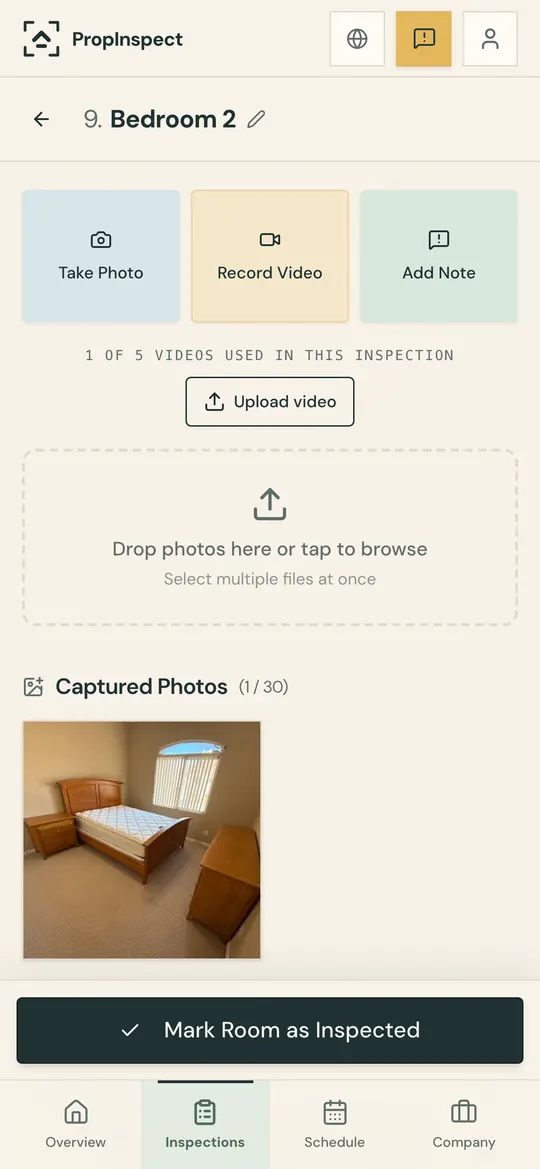
PropInspect is organized the way a good walkthrough is: room by room. In each room you record clips of up to 60 seconds, take photos of the details, and add notes tagged Info, Fix, or Damage, so the footage and the notes stay together instead of in your camera roll.
The finished walkthrough becomes one report with every room's clips, photos, and notes. Share it as a read-only link that opens without an account, or as a PDF.
Frequently asked questions
What's the difference between a walkthrough and an inspection?
They're closely related — a walkthrough is the act of moving through a property to capture its condition, and an inspection is the documented record that results. PropInspect turns your walkthrough into a structured, shareable inspection report automatically.
Can I record video during a rental walkthrough?
Yes. You can record short videos at the unit level for a full walkthrough or at the room level for specific details, all directly in your phone's browser with no separate app.
How long should a rental walkthrough video be?
Keep each clip under a minute and record one per room. A one-bedroom apartment usually ends up with six to ten clips plus photos, which is far easier to review than one long video.
Is the rental walkthrough app free?
You can do your first walkthrough free with no account. After that, each inspection is $0.99 and includes photos, video, notes, a shareable report, and a PDF. AI photo analysis, up to 5 per inspection, needs a free account.
Walk the unit. The report's already done.
Photos, video and notes land in the right room as you go. Share one link before you're back at the office: the repair person sees what to fix, the tenant sees why, the owner sees everything.
- Done at the door, not at your desk
- One link for everyone. No account, no app.
- Dated, room-by-room proof for when the deposit is due
First inspection free, then $0.99. No subscription.